IDEO U’s Insights for Innovation – Foundations of Design Thinking course consists of 2 courses: ‘Insights for Innovation’ and ‘From Ideas to Action’. In this blog post I share the 4 assignments belonging to the second course ‘From Ideas to Action.
Challenge
How might we enable blind travelers move independently across transfer points, feeling at ease in public?
Introduction Assignment
Why did you choose it?
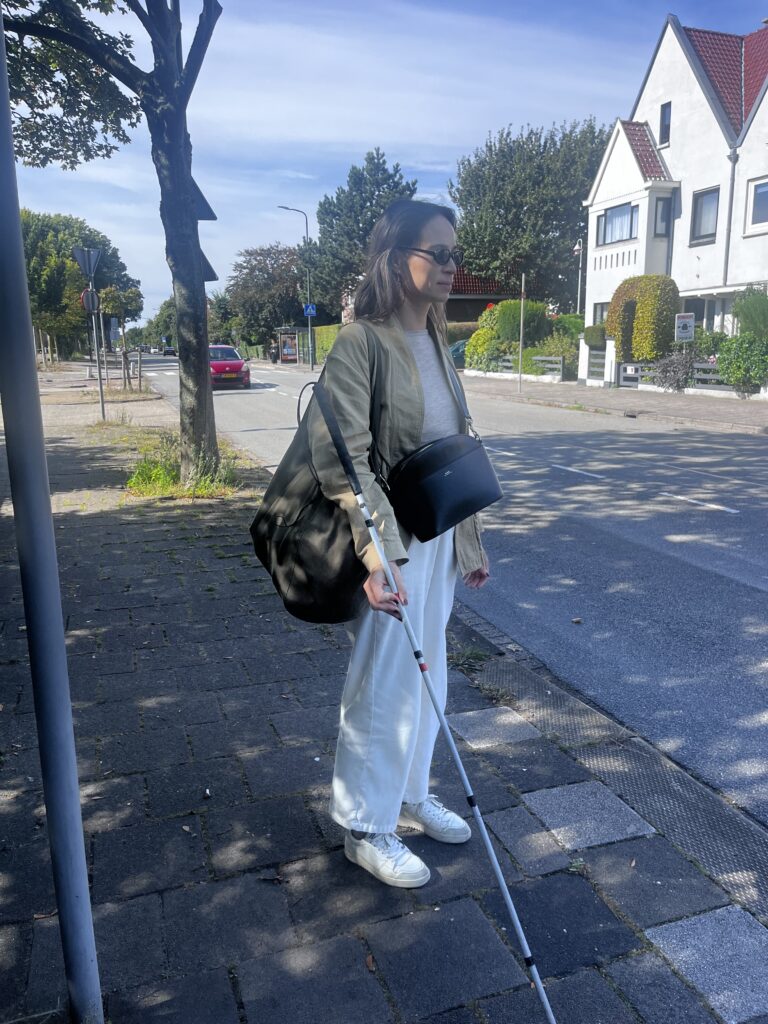
During IDEO’s Insights for Innovation course, it became clear that blind people face a real need for support in navigating independently during multi-modal journeys (e.g., transferring from bus to train or tram to bus). Technology is central to enabling independence, yet tools such as iPhone’s VoiceOver often remain cumbersome, especially with touchscreens. In addition, many blind travelers feel pressure to constantly adapt their behavior in public (eg modifying eating habits) to avoid standing out or “causing a mess.”
I am motivated to continue working with this target group because their resilience highlights how much those of us with vision take it for granted.
Anticipated challenges
- Access to participants: I am concerned about accessing the target group and find blind travelers actually willing to test my prototype. I plan to reach out to relevant organizations until I succeed.
- User-friendly technology: I foresee a challenge in creating a solution that is technically feasible and truly user-friendly.
What existing assumptions do you have about your chosen challenge?
The insights that I took from Insights for Innovation are the following:
- Blind travelers can navigate independently, but it’s at the ‘handover points’ (transfer between transport modes and indoor building way finding) where current technology and tools fail to ‘pass the baton’.
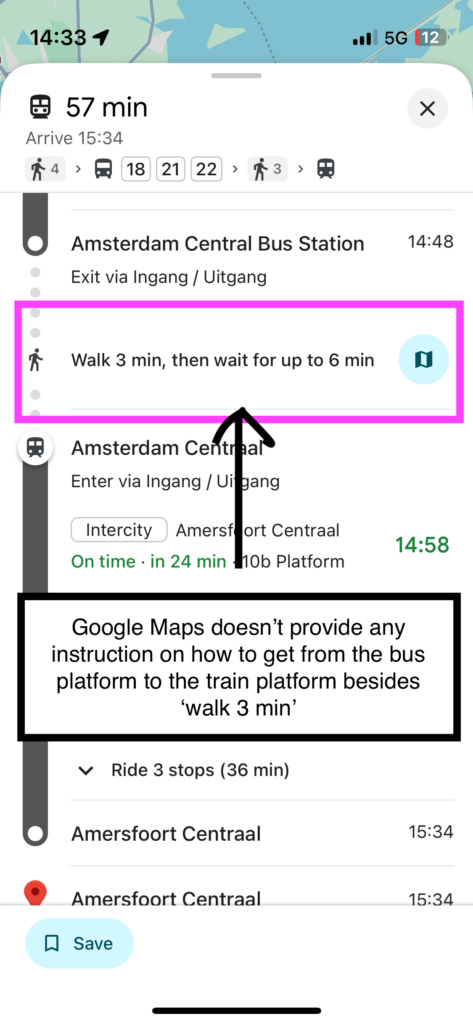
- For blind people, technology is indispensable, but it only empowers when built with them at the center, not as an afterthought.
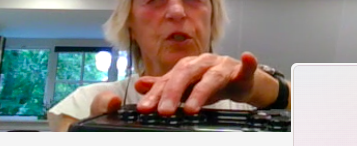
- For blind people, the hardest part of being in public is managing the tension between doing what is practical and meeting social expectations

Lesson 1 Ideate
Challenge
How might we enable blind travelers move independently across transfer points, feeling at ease in public?
Process to find blind participants
Before choosing the ideation method, I first really wanted to make sure that I could find someone willing to test my prototype. I therefore contacted plenty of organisations related to the blind and explained my challenge. For example, I reached out to various museums catered to giving people with vision a blind tour. I also contacted a restaurant in Amsterdam where people with vision can have a meal, blindly. Last, I reached out to various industry organisations. So far, I managed to find 1 blind person eager to help. I decided to invite him not only to the prototype testing session, but also to the brainstorm.
Ideation Method
I’ve chosen the method Putting myself into others’ shoes via storyboarding. I thought it would help me really thinking through the process step-by-step. Furthermore, the E-storm sounded interesting, so I chose that method as a second iteration.
Involvement
The blind man that I found via my emails will be involved.
Setting the stage
I don’t want to take too much time from the participant, so I will do a brainstorm by myself and then explain the ideas to him that we can then discuss.
Step 2: Ideate
How many ideas did you generate?
I managed to generate 14 ideas. I ideated by myself first, and then asked ChatGPT for more input. Based on the input, I iterated by combining my and GPT’s ideas. I discarded most of GPTs input.
How long did you ideate for?
I ideated for about an hour before calling my participant for the discussion. When I called him in the evening, it was all dark as he hadn’t switched the light on. Clearly, this didn’t matter to him but it was a funny moment.

How did the session go?
It was very interesting to hear the perspective of the participant on the ideas that I generated (together with ChatGPT). It was clear that neither me nor ChatGPT understand the challenges underlying some of the ideas that we came up with. Thanks to the participant’s help during the E-storm, we improved on the ideas.
Step 3: Converge
I first drafted the Storyboard to get into the mindset:
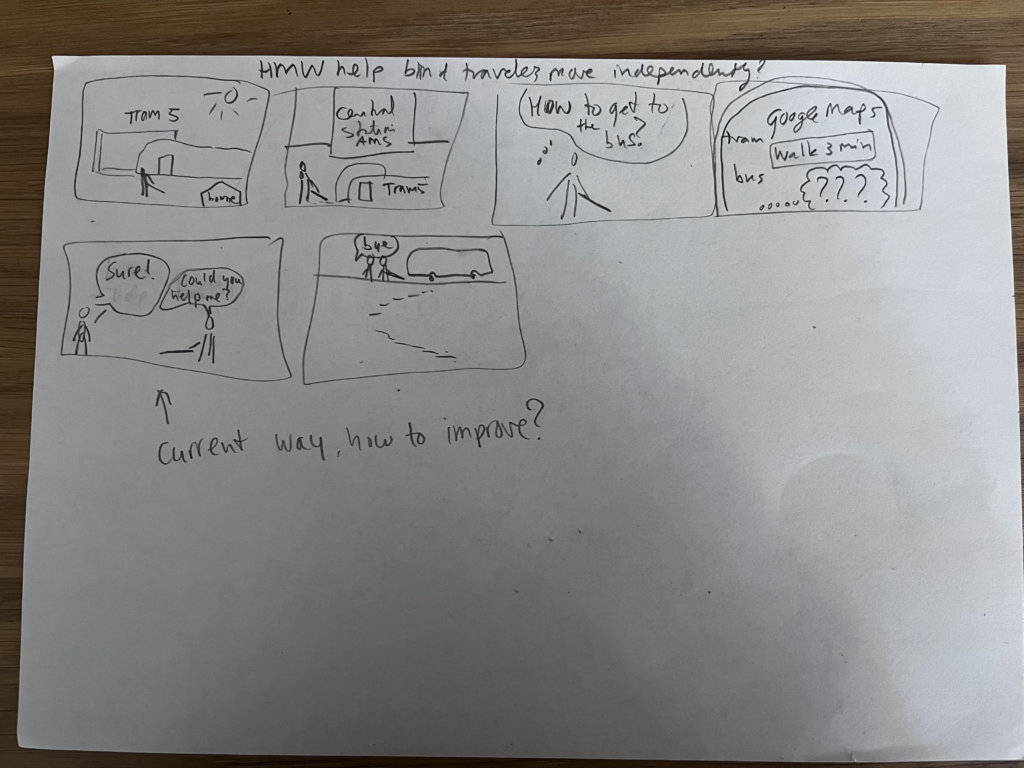
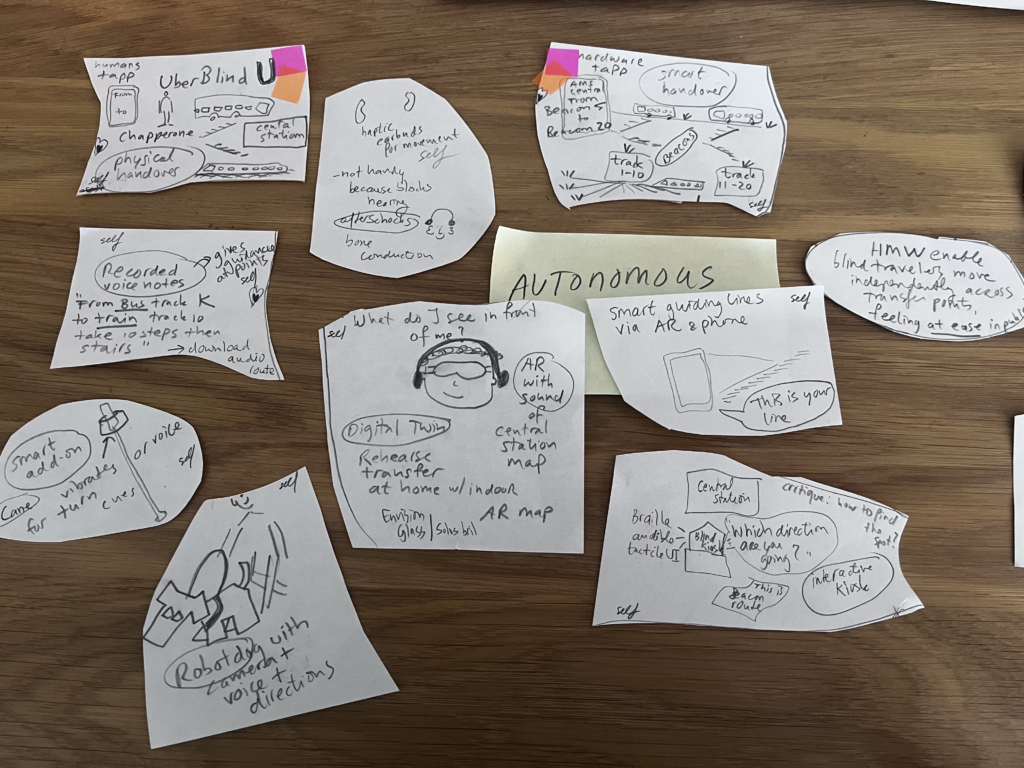
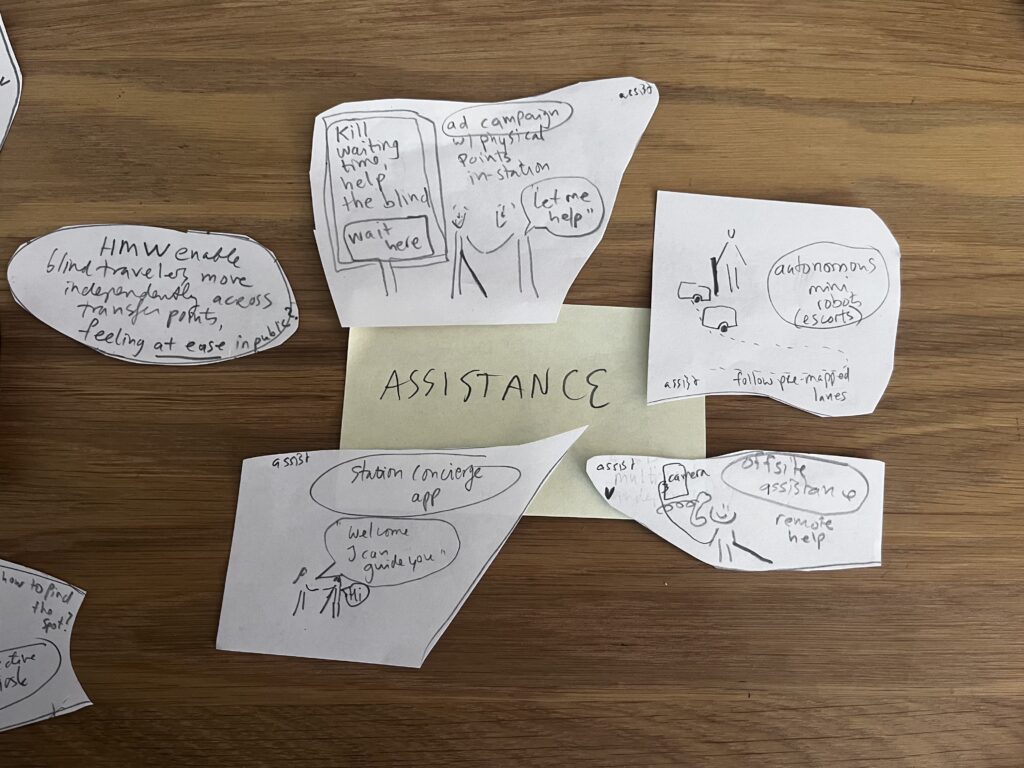
I then came up with ideas and eventually found 2 main categories of solutions. On the one hand, I had come up with solutions that were targeted at complete self-sufficiency. On the other hand, assistance from humans was still needed.

Zoom-in autonomous solutions:
Zoom-in assistance solutions:
Converging process
Together with the participant, we went through all the ideas and he gave context on some of them. In the end, we chose 2 ideas to prototype, the ones with the pink and orange stickers on them that each of us selected. We arrived at these two ideas through a combination of excitement level and elimination. Some of the ideas the participant already tried out or were a variation on tried-out-versions. The 2 chosen ideas were some of the most self-reliant suggestions. My participant spoke from the experience that whenever he would use public transport, he still calls the National Railway for human assistance during his journey, and how he finds it annoying to be dependent and having to wait. Besides travel, he mentioned that he also has trouble navigating within a mall. These statements were in lign with what I discovered during the previous course: blind people preferably are self-sufficient, with the biggest challenge indoors where GPS is not available. The selected ideas both solve this problem.
Idea 1 UberBlind
On-demand human assistance within a transfer point station or mall, without having to call a relative or the National Railway ahead of the assistance requested.
Idea 2 Smart Handover with Beacons
Via beacons, instructions to get from eg the bus to the train would be given. After having inserted the bus location and train platform, a beacon route would be outlined. At each beacon, the user would receive instructions to get to the next beacon and eventually the desired end-station.
Runner up idea 3 Recorded VoiceNotes
For each possible option within a multi-transfer platform or mall, specific voice notes would be downloadable to get from A to B within the indoor establishment. This is an oldskool alternative to Idea 2.
Lesson 2 Rapid Prototyping
Step 1: Build
Challenge
HMW enable blind travelers to move independently across transfer points with tools co-designed for them, while feeling socially at ease using them in public?
Audience
A blind traveler who I met via contacting a museum that offers guidance by the blind to people with vision. He enthusiastically responded to my open call for testers of my to-be-designed-prototype.
Unmet needs
The unmet need that I’m solving is how to travel independently during multi-transport journeys, especially at transfer stations / indoor areas. Participants that I’ve interviewed have told me how they hate being dependent on other people to get from A to B.
Build and Document
I’ve built two ideas as the input during the brainstorm resulted in excitement on 2 ideas specifically. I will show BOTH to the user and then ask him which idea seems more valuable to him. I will move forward with that ideo to test IRL.
- UberBlind – an app that helps users at transfer stations/indoors to get from one form of transport to the other. On-demand the user will get human help to get from one mode of transport to the other within the station.
- Smart Beacon Handover – via an app like UberBlind, users get a beacon itinerary to get from one mode of transport to the other within the station.
Steps for UberBlind:
- I ask GPT 5 to brainstorm along on how to build the prototype : “Let’s start with the first idea, uberblind. I’d like to create a couple of mockup screens for iphone that guide the blind user through the experience of ordering assistance on-demand. Let’s say we have only 3 options for assistance, Amsterdam central station, the hague central station, and utrecht station. Let’s say the user chooses amsterdam central station and is at the bus platform, he might be on platform A through K. He might need to go to the train or the tram. The train has different platforms, so does the tram. I’d like to create one user flow of the user starting at the bus stop, requesting uberblind, to take him to platform 15. can you create mockups for me?”
After some iterations, GPT generates code that I preview and I screenshot the mockups:
{/* Screen 1 */}
{iPhoneFrame(
﹤div className=”w-80 p-6″﹥
﹤h2 className=”text-xl font-bold mb-4″﹥Request Assistance﹤/h2﹥
﹤div className=”flex flex-col space-y-3″﹥
﹤button className=”bg-blue-600 text-white p-3 rounded-xl”﹥Amsterdam Central﹤/button﹥
﹤button className=”bg-gray-200 text-gray-800 p-3 rounded-xl”﹥The Hague Central﹤/button﹥
﹤button className=”bg-gray-200 text-gray-800 p-3 rounded-xl”﹥Utrecht Central﹤/button﹥
﹤/div﹥
﹤/div﹥
)}
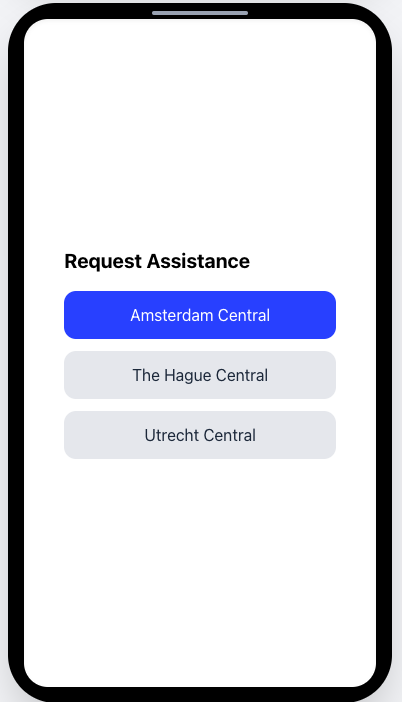
Step 2. I ask for a voiceover: “that is great. can you also somehow add a voiceover of how the user taps through the screens, and scroll down the mockups while you are doing the voiceover? Then I can record it and show it to the user as if it is real”
Step 3. I ask for a slide-deck version that includes the screens and the voiceover. It doesn’t give me exactly that but I know what to do. I open Canva and copy paste everything there. I then screenrecord the video.
Steps for Smart Beacon Handover
- I ask GPT to brainstorm along for the Beacon idea: “I would now like to work on idea 2: using beacons to guide a user from bus platform K to train platform 15. how would you prototype this, considering I dont have beacons. we could use a sketch or whatever it is, I just need something to show to the blind user, for him to give me feedback. I like the idea of a sketch, but also open to your suggestions. Use amsterdam central station as a guidance. the bus platform is on the highest floor. then you need to take the elevator or stairs for the main hallway, to then go through the poortjes to the train platforms. be creative”
We iterate a bit a GPT generates some versions of the floorplan incl the beacons:
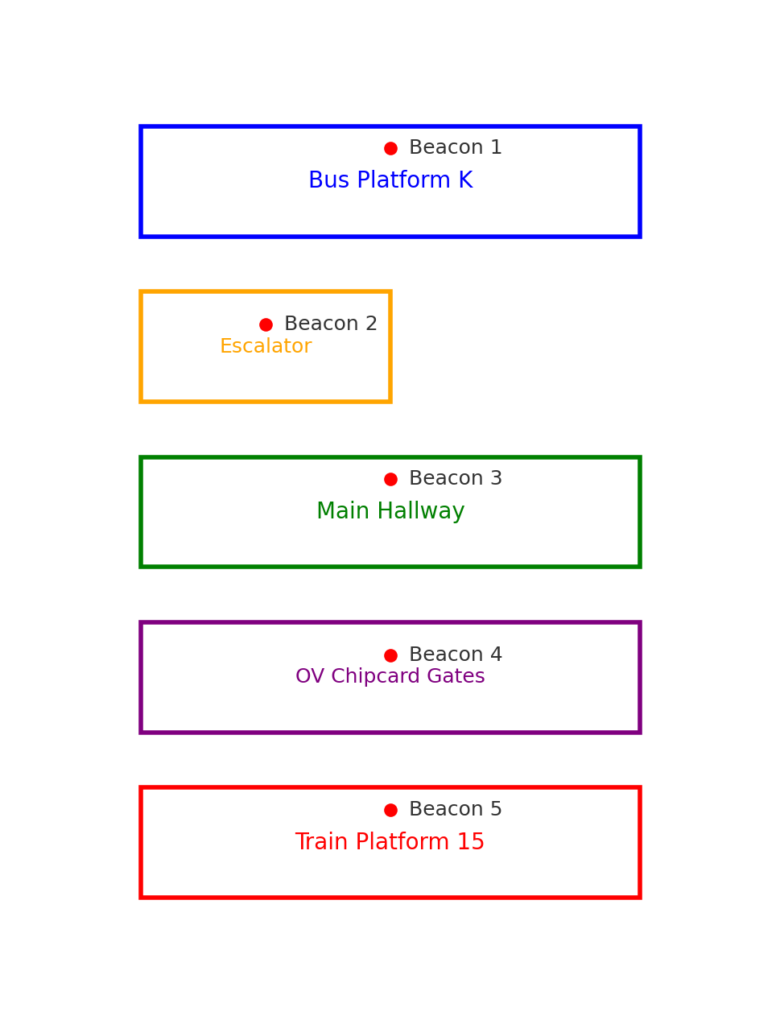
I iterate to this:
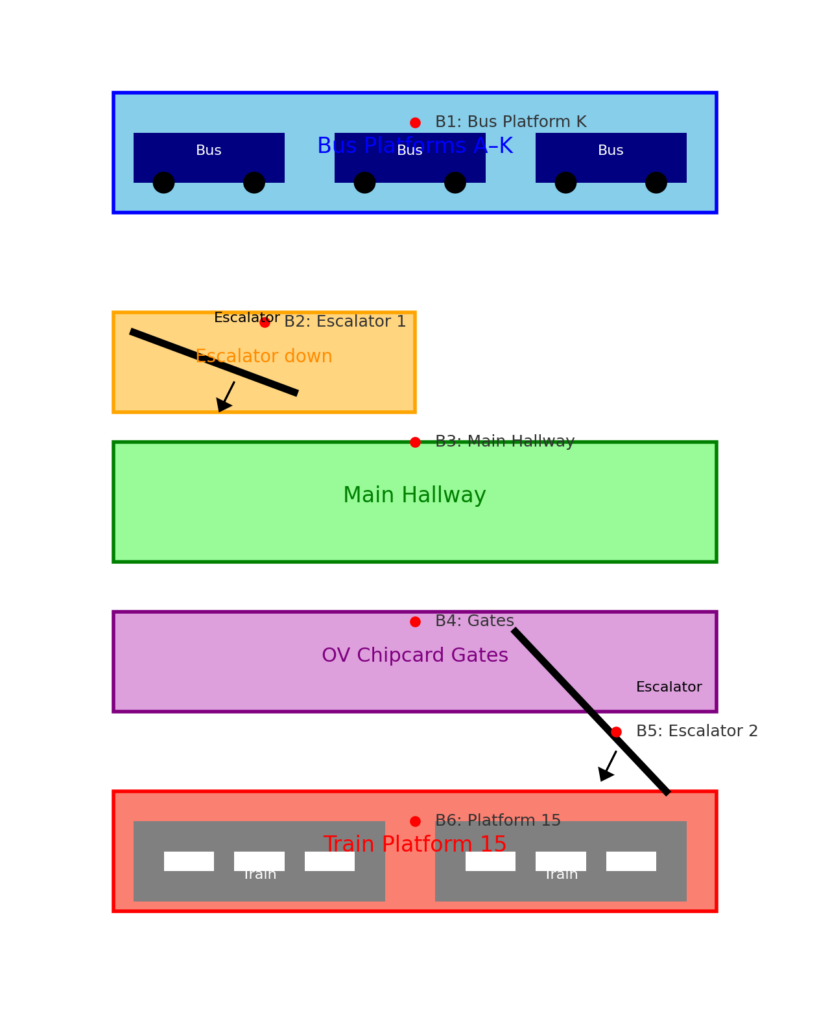
2. I ask for a voiceover for the beacons, and iterate until it is more or less accurate:
“Please be more specific on the guidance voiceover. beacon: you are at bus platform K. the train platform is one floor down. please head towards the escalator which is 10 steps to the left. then turn to your right and take the escalator. beacon: you are now in the main hallway the train platform is behind the OV Chipcard gate. To get to the gate, turn left and take 20 steps. Use your OV Chipcard to enter the train platform. beacon: you are now at the train platform. platform 15 is nearby. take 5 steps forward and then turn right. Take 10 steps and then take the escalator up. beacon: you are now at platform 15. Please check if your train departs at platform 15a or 15b. For platform A, turn left, take 3 steps, then turn left and take 50 steps. Enjoy your journey”
3. I insert the floorplan and the voiceover in Canva and record a video
Final prototypes that I will show to the user:
UberBlind (Created a Voiceover mode prototype to show to the blind tester. Might be good to view this video with speed 1.5x)
Smart Beacon Handover (Created a Voiceover mode prototype to show to the blind tester. Might be good to view this video with speed 1.5x)
Step 2: Share your prototype with others for feedback
I want to learn:
- “Does this feel like something you would want to use in real life?”
UberBlind
- What is helpful about this flow?
- What is missing or annoying?
- If you could change one thing, what would it be?
- Would you feel comfortable using this in a busy station?
- What information would you want to hear when you request assistance (e.g. assistant’s name, location, arrival time)?
Smart Beacon Handover
- Which beacon instruction was most useful?
- Which one felt unclear or unhelpful?
- What would make these instructions easier to follow in real life?
Comparing
- Between these two ideas, which one feels more valuable to you to get from one mode of transport to the other?
- Why?
- What would you want us to improve first if we built this for real?
- Is there something you expected but didn’t get?
Step 3: Reflect on what you learned
Process
I met the blind test user and I explained that I had created two prototypes and that I was curious to hear his opinion on both. He understood the assignment and we went over the pre-recorded VoiceOver videos of Smart Beacons and UberBlind. I instructed him to pretend that he was requesting an assistant via UberBlind, and to pretend that he was walking through Amsterdam Central Station from the bus to the train platform.
This is what that looked like:
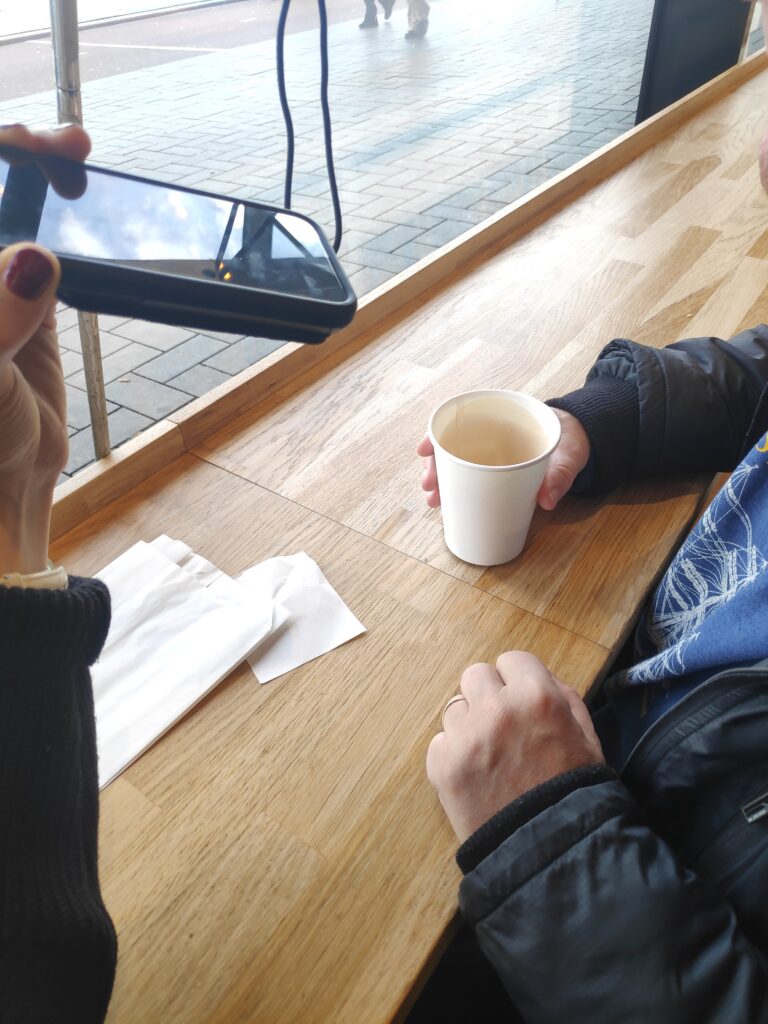
After I played both videos, I asked for feedback to compare the prototypes and to understand what worked and what didn’t.
Reflections
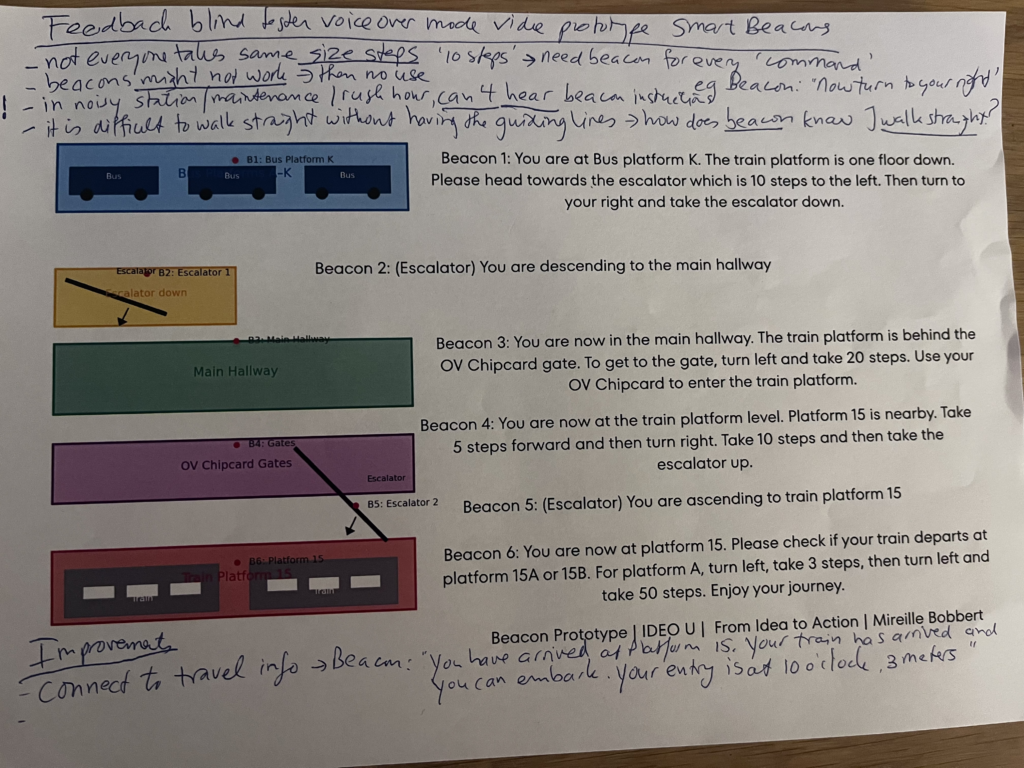
Smart Beacon Handover: we questioned real-world usability
Negative remarks
There were quite some negative remarks on the Beacon solution, mostly related to different flaws that we would encounter in practice. For example, not everyone takes the same size of steps. Instead, you would ideally need a beacon every time the user needs to ‘do’ something other than walk straight. Furthermore, the beacons might not work due to some technicality, in which case they would be useless. Also, in noisy station / maintenance work like drilling / rush hour, a blind user wouldn’t be able to hear the beacon instructions. Furthermore, we came to realize that a beacon doesn’t know if someone walks straight, so we questioned whether the solution works without any extra guidance. Last, currently there are no beacons in stations.
UberBlind: straightforward and radiating trust
Positive
The test user was very positive about the walk-through of UberBlind. He mentioned the menu structure and purpose were both clear. The assistance being human creates trust. In addition, the app is straightforward to create, and wouldn’t need hardware in the stations.
To improve
The success of the app depends on the availability of the assistants at the moment the user requests assistance. The user mentioned that the app could be linked to the staff of the National Railway that work in the station.
Conclusion
In the end, the user highly preferred Uberblind over the Smart Beacon solution because the app gives trust thanks to the human guidance, and the user would be less dependent on the tech working, as the largest part is executed by real people.

Reflections
It was great to test multiple solutions simultaneously to get feedback on what works in practice, rather than imagining the outcome myself without having talked to any stakeholder. Furthermore, the excitement of the test user and willingness to launch this, inspired me to see how to take this further in real life. UberBlind would provide a significant advantage to the current solution to call the National Railway a day before any journey to ensure assistance on the platforms, vs an on-demand service. I am inspired to see if I could set up an experiment with the National Railway at Amsterdam Central Station to test the prototype not only with the end user but also with the assistants.
Lesson 3 Iterate
Step 1: List your questions
UberBlind
Desirability
- How can we ensure the human-assistance experience continues to feel trustworthy and personal as the service scales?
- What moments in the journey (e.g., train boarding, pickup location) make the user feel most vulnerable, and how can the app best support those?
Feasibility
- How can the app guarantee that an assistant is available exactly when and where the user requests help?
- What data or coordination would be needed between UberBlind and NS station staff to make real-time assistance possible?
Viability
- How might this service integrate into the existing railway or mobility-assistance systems in the Netherlands?
- What sustainable model (e.g., paid partnership with NS, subscription, government support) would make this service financially viable long term?
Smart Beacon Handover
Desirability
- Would blind users trust or rely on a fully technical system without human support in crowded or noisy environments?
- In what situations would users prefer to use the beacon system instead of asking for human assistance?
Feasibility
- How could the system account for differences in walking speed, step size, and environmental noise?
- What infrastructure changes (e.g., installing beacons in all stations) and maintenance would be required to make this work reliably?
Viability
- Who would be responsible for installing, maintaining, and funding the beacons within stations?
- Could the beacon system integrate into existing navigation apps or station infrastructure to reduce setup costs?
Step 2: Prioritize top questions
Even though the Smart Beacons prototype review revealed various flaws, I still want to continue testing both solutions. Hence, I will have a critical look at my questions to prepare the next session.
UberBlind questions prioritized
Desirability: What moments in the journey (e.g., train boarding, pickup location) make the user feel most vulnerable, and how can the app best support those?
–﹥ This is my top question as the user mentioned the human element creates trust. Finding out when the user feels most vulnerable is the spot where UberBlind can make the difference and make the user feel safe and comfortable to create more trust in using the app and its service.
Feasibility: How can the app guarantee that an assistant is available exactly when and where the user requests help?
–﹥ This is my second most important question because without assistants, the app is useless. The most straightforward way would be to work with NS personnel, so I want to try to get in contact with them to see how they think about it.
Viability: How might this service integrate into the existing railway or mobility-assistance systems in the Netherlands?
–﹥ Integration determines adoption and sustainability. If NS or similar organisations see alignment, they could host, fund, or endorse the app. Without that fit, the model risks redundancy. Also, could this be part of the NS app, making it an NS in-app service?
Smart Beacons questions prioritized
Desirability: Would blind users trust or rely on a fully technical system without human support in crowded or noisy environments?
–﹥ This is the core barrier to desirability. If users don’t trust a fully technical system, the service will fail. The test feedback suggested skepticism (noise, unpredictability, and lack of feedback make users uneasy), so the first thing to test is desirability.
Feasibility: What infrastructure changes (e.g., installing beacons in all stations) and maintenance would be required to make this work reliably?
–﹥ Infrastructure and maintenance are the biggest practical blockers as the stations currently aren’t equipped with this hardware. Installing and maintaining beacons would require cross-institutional collaboration (e.g., NS, ProRail). Without a clear plan, the concept is unrealistic.
Viability: Who would be responsible for installing, maintaining, and funding the beacons within stations?
–﹥ Ownership is the key viability gap. Without a clear stakeholder or funding source, the system will never move beyond a prototype. Who would own the beacons or who could we partner up with?
Step 3: Ideate to explore options
I wanted to do a role play to put the prototypes to the test. The test user was up for this!
Smart Beacons Roleplay test: main findings
During the initial feedback on the prototype, the user proposes that the beacon should speak when the user needs to perform an action other than walking straight. That’s the approach in the next video where I role play being the beacons (advised to put on 1.5x speed : ))
In practice, the user and I notice as many flaws as we had imagined talking it over: it is very hard to determine if the user walks straight, it is vague when they need a command, and even watching the user while pretending to be a beacon, I didn’t trust the user walking by himself through the busy station with so many (moving) obstacles all around him. This role play test gave me and the user enough insight to determine that this option doesn’t make sense from a desirability perspective. Therefore, investigating feasibility and viability are irrelevant.
UberBlind Role play Test: main findings
1. Meeting the blind user as an assistant I realised being an assistant is a service in and of itself: a bit of professionalism wouldn’t hurt. In this video I stumble my way through telling the user to which platform I will take him:
2. Upon arriving at the departing platform, the test user mentioned that he always wants to know in what part of the train he is seated so that for the assistant on the next platform it is clear where they need to pick him up.
In addition, he wants the assistant to wait until the train arrives so that he is sure to get onto the right train. On the image below you will find the changes.
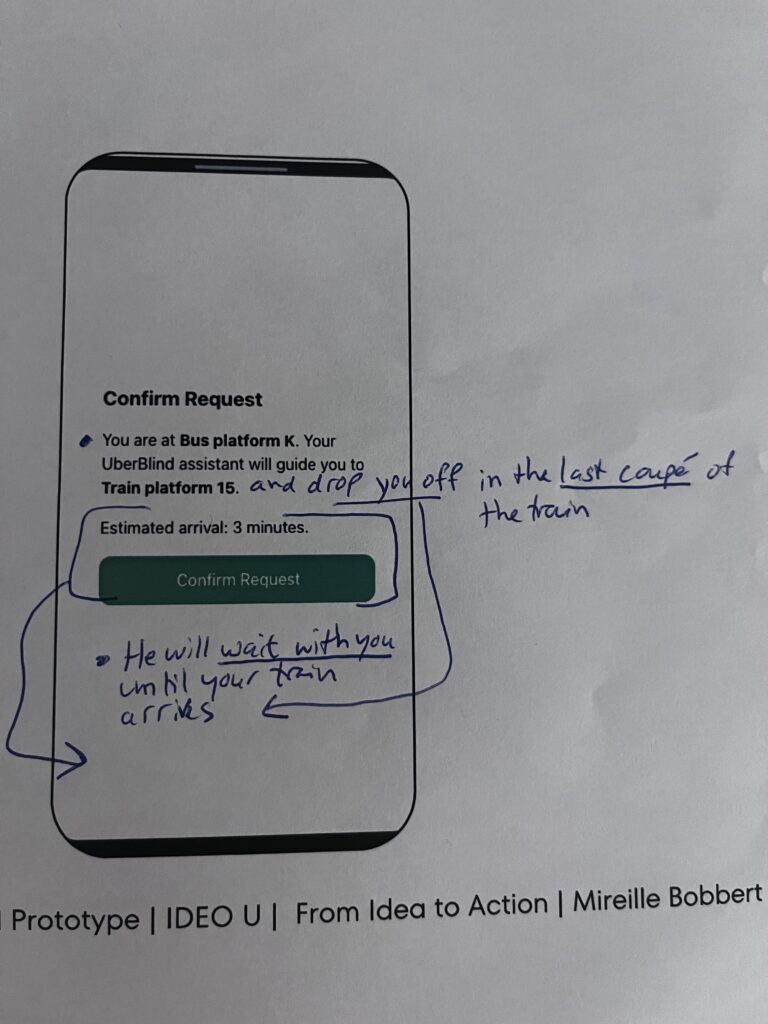
All in all, the user is excited about the service if his suggestions about assistance waiting until the departure of the train, and selection of the seating are taken into account. He asks when I will take it to production, and asks if I can do an experiment with one NS station.
Step 4: Prepare a plan to prototype
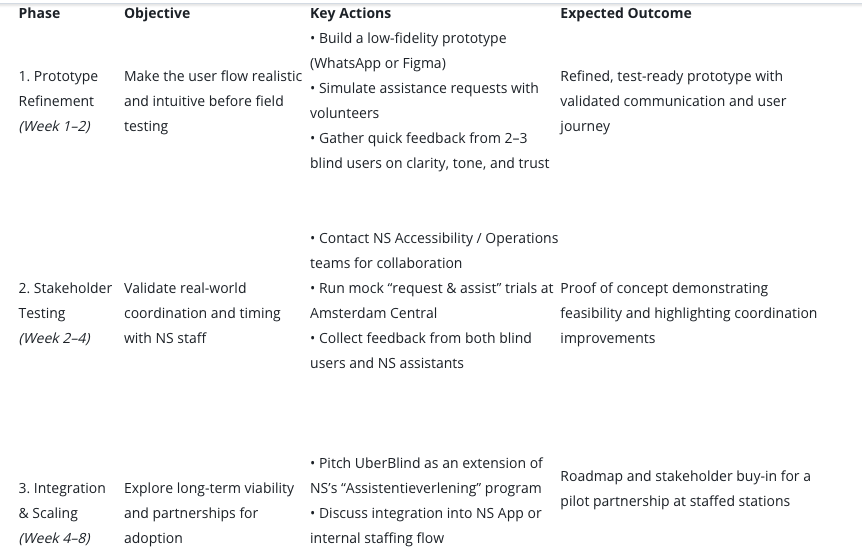
I would focus solely on UberBlind as the test revealed that in practice, the Smart Beacon solution is difficult to implement in a way that is desirable. My next steps with UberBlind would be:
Reflections
The role play of both solutions was extremely insightful because even if you talk someone through an experience, it is still meaningful to experience the service in real life. Receiving feedback directly from an actual user made the role play even more exciting, as I thought his insights were so valuable to improve the Uberblind service in the future. Before I started this second course I could never have imagined to come up with something so tangible and fairly straightforward to implement that could have a significant impact!
Lesson 4 Pitch
Step 1: Review Your Previous Assignments
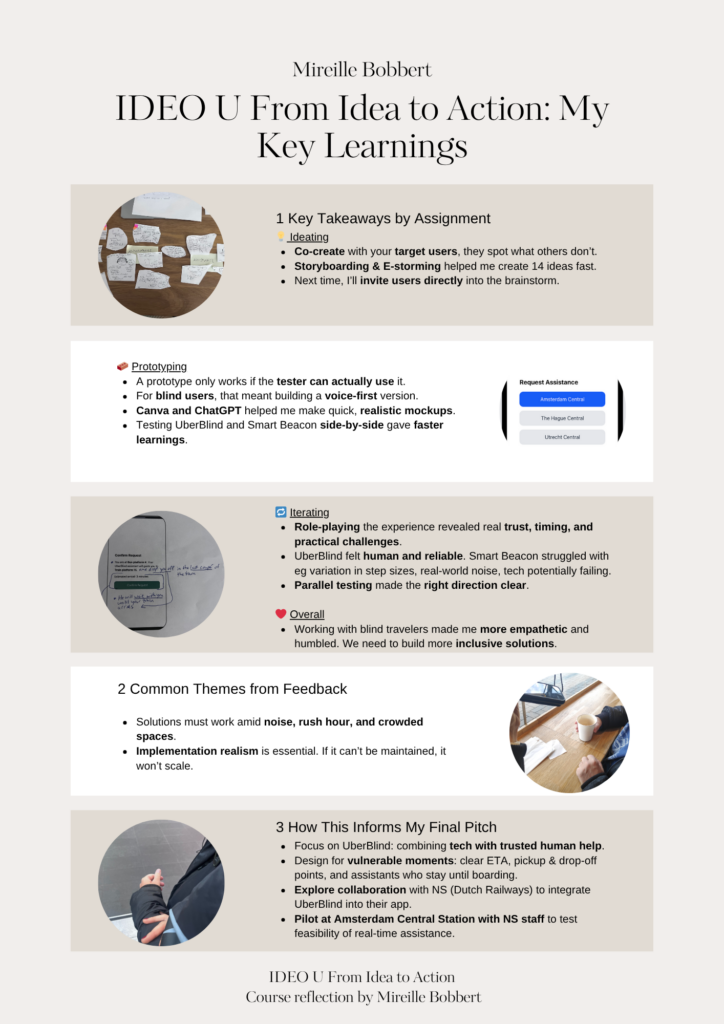
Key takeaways by Assignment
Ideating
- Co-create with at least one target user. They surface edge cases and realities others miss.
- This time I brainstormed first and then asked for feedback; next time I’ll co-ideate with the user in the session.
- Methods that worked: storyboarding (“put myself in their shoes”) and E-storming (fast divergence). I generated 14 ideas in ~1 hour, then refined them with ChatGPT.
Prototyping
- A prototype is only useful if the tester can actually use it. For blind users that meant a voice-over / voice-first prototype.
- ChatGPT + Canva helped me build multiple realistic mockups and narrated videos quickly.
- Prototyping two concepts in parallel (UberBlind and Smart Beacon) gave clearer, faster learnings.
Iterating
- Role-play ﹥ discussion. Simulating the station journey exposed trust, timing, and handover issues that slides can’t reveal.
- UberBlind felt trustworthy and feasible because of the human element and no hardware needed.
- Smart Beacon proved impractical due to variation in step sizes, real-world noise, tech potentially failing, crowds, and infrastructure failing.
- It was my first time doing parallel prototype testing, this human-centered approach made decisions obvious.
Overall
- Working with blind travelers made me more empathetic and humbled. I appreciate my good vision a lot more even though I wear glasses. The world is designed for people with vision. Being able to see clearly has extreme efficiency gains and comfort vs those who cannot see or are visually impaired.
Common themes from feedback
- Solutions must work in noise and crowds (announcements, construction, rush hour) and around moving obstacles.
- Implementation realism matters: if operations/infrastructure can’t support it, desirability won’t translate to adoption.
How this informs my final pitch
- Focus on UberBlind: tech + trusted human assistance at transfers (stations, malls).
- Design for key vulnerability moments: professional pickup and handover are key. The solution should include a clear ETA so that users are sure someone is going to pick them up. Furthermore, the pickup spot must be exact, and a specific drop-off point must be clear to both user and assistant. In addition, the user must know that the assistant is willing to wait until the departing transport mode has arrived in order to embark for full reassurance and comfort.
- Seek interest from the National Railways (NS) to adopt this service into their app
- If the NS is interested, do an experiment on Amsterdam Central Station with NS personnel who works at the station to see whether working with NS personnel is a good start on the assistant side in meeting the on-demand USP of the solution.
Step 2: Write, Record, or Design Your Pitch